IT Support Specialist Career Roadmap
IT support is the last job in tech where showing up curious and certified still beats a degree. When the CFO's laptop dies mid-quarter-close, nobody asks where you went to school — they ask if you can fix it. This is the trade entrance to the entire industry: sysadmins, cloud engineers, and security analysts overwhelmingly started here, resetting passwords and learning how businesses actually run one ticket at a time. The work is unglamorous and the ceiling is wherever you decide to stop climbing.
Is this the right path for you?
IT support is the widest door into tech and the one with the fewest gatekeepers. Career changers from retail, hospitality, the military, and warehouse work land help desk roles every month with nothing but a CompTIA A+ and a decent interview. No degree required — genuinely, not as a marketing line. If you have ever been the person friends call when the printer rebels or the Wi-Fi dies, you have already done unpaid tier-1 support.
The aptitude signal is patience under repetition. You will reset the same password forty times, explain the same VPN steps to the same executive, and troubleshoot problems whose root cause is a cable someone kicked. People who treat each ticket as a small puzzle — and who can stay kind at 4:45 PM on a Friday — thrive. People who need novelty every hour burn out fast.
Honest note: entry-level support pays modestly and the first year can feel like customer service with extra steps, because it partially is. The competition for remote help desk roles is heavy; on-site roles are far easier to land. Treat the help desk as a two-year launchpad, not a destination — the specialists who stack Network+ or Security+ on top of real ticket experience move into sysadmin, cloud, or security roles where salaries jump fast.
Career Progression
Where does this role lead?
Click any role to explore timeline, key skills and, where the Department of Labor publishes it, pay.
Entry
Help Desk Tier 1
~0–1 yr
$42,349 (Level I)
You're the first line of contact — most of the job is patience and documentation. Close tickets fast, write down what you learn, and study for CompTIA A+ on the side.
Key skills
Pay shown is the U.S. Department of Labor prevailing wage for Level I (entry), Level III (mid) and Level IV (senior) in the nearest BLS occupation, base wage for the typical metro, wage year 2025, shown for the main track only. It is a benchmark, not an offer; branches and lead, staff and executive stages have no official figure.
Visual roadmap
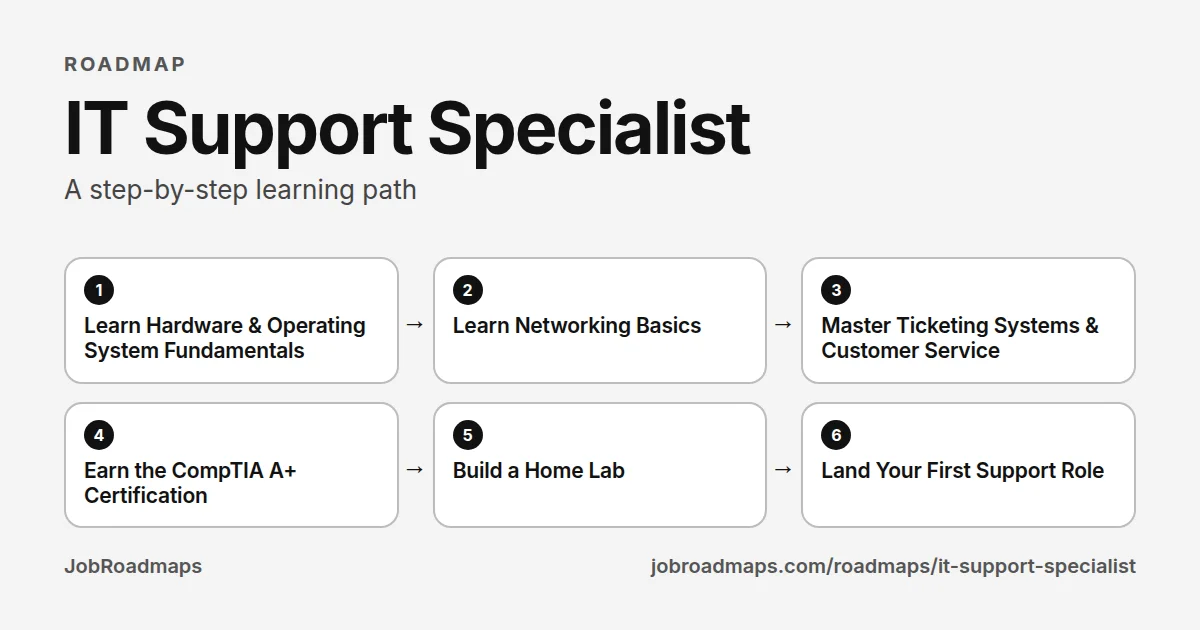
IT Support Specialist learning path
Work down the line, one step at a time. Tick each skill as you can do it.
- 1
Learn Hardware & Operating System Fundamentals
3–4 weeksUnderstand what a computer actually is: components, storage, RAM, BIOS/UEFI, and how Windows, macOS, and Linux boot, update, and break. Practice installing operating systems from scratch and troubleshooting boot failures — this is the daily bread of support work.
Skills to learn
- PC Hardware (CPU, RAM, storage, PSU)
- Windows 11 Administration
- macOS Basics
- Linux Fundamentals (Ubuntu)
- BIOS/UEFI & Boot Process
- OS Installation & Imaging
- Device Drivers & Peripherals
- File Systems (NTFS, APFS, ext4)
- Command Line Basics (cmd, PowerShell, bash)
Start with
- 2
Learn Networking Basics
3–4 weeksHalf of all support tickets are secretly networking problems. Learn IP addressing, DNS, DHCP, Wi-Fi troubleshooting, and how to read the output of ping, tracert, and ipconfig like a detective reads a crime scene.
Skills to learn
- TCP/IP Fundamentals
- IP Addressing & Subnets (basics)
- DNS & DHCP
- Wi-Fi Troubleshooting
- ping / tracert / nslookup / ipconfig
- Routers, Switches & Access Points
- VPN Client Configuration
- Common Ports & Protocols
Start with
- 3
Master Ticketing Systems & Customer Service
2–3 weeksSupport is a communication job that happens to involve computers. Learn how ticketing workflows, SLAs, and escalation paths work, and practice writing ticket notes a stranger could act on. The technician who documents well gets promoted; the one who fixes silently stays put.
Skills to learn
- Ticketing Systems (Jira Service Management, Zendesk, ServiceNow)
- SLA & Priority Triage
- Escalation Procedures
- Ticket Documentation & Knowledge Base Writing
- Remote Support Tools (TeamViewer, RDP, Quick Assist)
- Active Listening & De-escalation
- ITIL Foundations (concepts)
- Asset Management Basics
Start with
- 4
Earn the CompTIA A+ Certification
6–10 weeksThe A+ is the hiring filter for entry-level IT — two exams (220-1101 and 220-1102) covering hardware, operating systems, security basics, and troubleshooting methodology. It is the single credential that reliably gets resumes past HR for help desk roles.
Skills to learn
- CompTIA A+ Core 1 (220-1101)
- CompTIA A+ Core 2 (220-1102)
- Troubleshooting Methodology
- Security Fundamentals (malware, MFA, permissions)
- Mobile Device Support
- Cloud & Virtualization Concepts
- Operational Procedures & Safety
- Exam Simulation & Practice Tests
Start with
- 5
Build a Home Lab
3–5 weeksNothing on a resume says "hire me" like a home lab. Spin up virtual machines, build a Windows domain with Active Directory, break things on purpose, and document how you fixed them. This is where certification knowledge becomes interview stories.
Skills to learn
- VirtualBox / VMware / Proxmox
- Windows Server & Active Directory
- Group Policy Basics
- DNS/DHCP Server Setup
- Linux Server Administration
- PowerShell Scripting Basics
- Backup & Restore Practice
- Lab Documentation (GitHub / wiki)
Start with
- 6
Land Your First Support Role
4–8 weeksApply broadly: help desk, desktop support, MSP (managed service provider) technician, and field tech roles all count. MSPs are chaotic but compress three years of experience into one. Tailor your resume around the A+, the home lab, and any customer-facing work history — retail and food service translate better than you think.
Skills to learn
- Resume Writing for IT (ATS-friendly)
- Framing Non-Tech Experience
- Interview Troubleshooting Scenarios
- Common Interview Questions (A+ level)
- LinkedIn Profile Optimization
- MSP vs Internal IT Trade-offs
- Salary Negotiation Basics
Start with
jobroadmaps.com/roadmaps/it-support-specialist · Pay, demand and employer data for this role are further down the page.
Job Market Insights for IT Support Specialist
Data-backed
Which skills appear most in job postings?
Read from live job postings, ranked from most to least often named.
documentation leads the list and is named almost always. If you are only going to learn one thing before applying, the postings say start here.
The 1 base skill sit at the top of the scale, appearing across company sizes and seniority levels. Treat them as the baseline an application is read against.
Past the fundamentals, 6 specialisation skills (scripting among them) appear in a minority of postings. Not universal, but the kind of depth that makes a hiring manager stop skimming.
Skill
How often named
documentation
scripting
automation
DevOps practices
ticketing systems
vendor management
Slack
Sorted by how often named · JobRoadmaps
Data-backed
Which tools and artifacts appear most in job postings?
Read from live job postings, ranked from most to least often named.
JAMF is the most-named tool, but no tool is a universal requirement here.
Tool / Artifact
How often named
JAMF
Intune
Sorted by how often named · JobRoadmaps
Industry overlay
Targeting a specific industry?
The core roadmap gets you through the door anywhere. The difference between "qualified" and "they hired someone else" often lives in industry-specific context — the norms, the compliance floors, the tools assumed fluent in that sector.
SaaS admin consoles
The job is administering Google Workspace, Slack, Okta, and Zoom tenants — user lifecycle in the cloud replaces on-prem server work.
MDM (Jamf/Intune)
Tech companies run large Mac fleets managed through Jamf — zero-touch deployment and policy management are core daily tools.
SSO & SCIM troubleshooting
Every app hangs off single sign-on, so broken SAML assertions and deprovisioning sync failures land on the IT queue.
Scripting for automation
Onboarding 20 engineers a week manually does not scale — basic Bash or Python for repetitive tasks separates you from ticket-takers.
Remote-first support
Distributed workforces mean you fix laptops you will never touch — remote diagnostics and clear async communication are the job.
Companies hiring:
OktaAtlassianHubSpotZendeskSalesforceDevOps practices
AI companies increasingly adopt DevOps and infrastructure-as-code patterns, requiring IT specialists versed in modern systems engineering.
identity and access management
Security-first AI companies require robust IAM to manage access to sensitive models, data, and compute resources across global teams.
multi-region IT operations
Global AI companies with offices across APAC, Europe, and Americas need IT specialists who can support distributed regional operations.
Companies hiring:
CohereOpenAIIndustry premiums based on aggregated job posting data · Updated quarterly
Interactive
How ready are you right now?
Check the skills you already have to see your current job-market fit.
The most-named skill for this role is documentation, so a gap there costs you the most. Skills at the top of the scale appear across most postings, so a single gap there narrows your options more than a gap in a rarer skill. Check what you already have to see your biggest current gap.
Readiness Check
Check the skills you already have
0/7
base skills
Your biggest gap: documentation, the most often named of the skills you have not ticked.
Start there, then work down the list.
Books worth reading as a IT Support Specialist
Where to start, in order. The full list of 12, grouped by career stage, is on its own page.
Getting started
CompTIA A+ Complete Study Guide, 2-Volume Set: Core 1 Exam 220-1201 and Core 2 Exam 220-1202
by Quentin Docter, Jon Buhagiar · 2025
~1740 pages~44 hrs to read
Exam-aligned coverage of hardware, networking, operating systems, mobile devices, security and troubleshooting. The standard first certification for help desk work, best used alongside hands-on practice.
View book →Windows 11 Inside Out
by Ed Bott · 2022
A detailed reference for configuring, managing and troubleshooting Windows 11. Keep it close during your first months, when most tickets involve a Windows machine.
View book →
Doing the job
CompTIA Network+ Study Guide: Exam N10-009
by Todd Lammle, Jon Buhagiar · 2024
Exam-aligned coverage of networking concepts, infrastructure, operations, security and troubleshooting. Take it up when you can handle desktop issues and want to move toward network and systems roles.
View book →CompTIA Security+ Study Guide: Exam SY0-701
by Mike Chapple, David Seidl · 2023
Covers threats, identity, network and system security and operations. A natural next certification as support staff take on account, endpoint and patching responsibilities.
View book →
Senior and leading

The Practice of System and Network Administration, Volume 1: DevOps and Other Best Practices for Enterprise IT
by Thomas A. Limoncelli, Christina J. Hogan, Strata R. Chalup · 2001
~1230 pages~31 hrs to read
Broad guidance on running IT services: change management, monitoring, service desks, documentation and teamwork. Read it as you move into systems administration or lead a small IT function.
View book →
Time Management for System Administrators: Stop Working Late and Start Working Smart
by Thomas A. Limoncelli · 2005
~230 pages~6 hrs to read
Practical habits for handling interruptions, tickets and projects without burning out. Valuable for senior support staff who must balance user requests with improvement work.
View book →
All 12 books for a IT Support Specialist →Browse all books →
Some book links are affiliate links: we earn a small commission if you buy, at no cost to you. It does not affect what we list.
Prerequisites & Education
What credentials do employers look for?
These are the most common paths into this role — no single one is required.
Education Level
View list — coming soon- High school diploma plus certifications — the most common entry path
- Associate's degree in IT, computer science, or network administration
- Bachelor's degree in any field — helpful for advancement, not required for entry
- No degree — CompTIA A+ plus demonstrated troubleshooting skill gets interviews
IT support is one of the few tech roles where certifications genuinely substitute for a degree. Most job postings list A+ or equivalent experience, not a bachelor's.
Certifications
View list — coming soon- CompTIA A+ — the industry-standard entry credential; two exams covering hardware, OS, and troubleshooting
- Google IT Support Professional Certificate — beginner-friendly, ACE-recommended for college credit
- CompTIA Network+ — the natural second cert; opens NOC and junior network roles
- CompTIA Security+ — required for many government and defense-contractor support roles (DoD 8140)
A+ is the anchor. Stack Network+ and Security+ within your first two years — the trio is the standard help desk → sysadmin ladder.
Bootcamps & Training
View list — coming soon- Google IT Support Certificate (Coursera) — 3–6 months, self-paced, widely recognised
- Per Scholas — free, full-time IT training with strong employer placement partnerships
- CompTIA CertMaster or Professor Messer (free) — exam-focused prep for A+/Network+/Security+
- Year Up — free program for young adults combining training with a corporate internship
You do not need an expensive bootcamp for IT support. Free and low-cost cert prep plus a home lab covers what employers screen for.
Portfolio & Other
View list — coming soon- Home lab — spare PC or virtual machines running Windows, Linux, and Active Directory
- Documented troubleshooting writeups — show your diagnostic process, not just the fix
- Ticketing system familiarity — practice with Jira Service Management, Zendesk, or osTicket
- Customer service experience from any industry — retail and call-center backgrounds transfer directly
- Volunteer IT work — school districts, nonprofits, and churches always need tech help
Hiring managers for support roles screen for two things: can you troubleshoot methodically, and can you stay patient with frustrated users. Evidence of either beats a longer cert list.
Your Roadmap
6 stepsLearn Hardware & Operating System Fundamentals
3–4 weeksUnderstand what a computer actually is: components, storage, RAM, BIOS/UEFI, and how Windows, macOS, and Linux boot, update, and break. Practice installing operating systems from scratch and troubleshooting boot failures — this is the daily bread of support work.
Skills to learn
Learn Networking Basics
3–4 weeksHalf of all support tickets are secretly networking problems. Learn IP addressing, DNS, DHCP, Wi-Fi troubleshooting, and how to read the output of ping, tracert, and ipconfig like a detective reads a crime scene.
Skills to learn
Master Ticketing Systems & Customer Service
2–3 weeksSupport is a communication job that happens to involve computers. Learn how ticketing workflows, SLAs, and escalation paths work, and practice writing ticket notes a stranger could act on. The technician who documents well gets promoted; the one who fixes silently stays put.
Skills to learn
Earn the CompTIA A+ Certification
6–10 weeksThe A+ is the hiring filter for entry-level IT — two exams (220-1101 and 220-1102) covering hardware, operating systems, security basics, and troubleshooting methodology. It is the single credential that reliably gets resumes past HR for help desk roles.
Skills to learn
Build a Home Lab
3–5 weeksNothing on a resume says "hire me" like a home lab. Spin up virtual machines, build a Windows domain with Active Directory, break things on purpose, and document how you fixed them. This is where certification knowledge becomes interview stories.
Skills to learn
Land Your First Support Role
4–8 weeksApply broadly: help desk, desktop support, MSP (managed service provider) technician, and field tech roles all count. MSPs are chaotic but compress three years of experience into one. Tailor your resume around the A+, the home lab, and any customer-facing work history — retail and food service translate better than you think.
Skills to learn
Start here this week
This week: download VirtualBox, install Windows 11 and Ubuntu in virtual machines, and deliberately break and repair both. Then start Professor Messer's free A+ 220-1101 video course — watch two videos a day and take notes as if you'll teach it back. That's zero dollars spent and you're already ahead of most applicants.
For a structured path, the Google IT Support Professional Certificate on Coursera covers the full support toolkit in 3–6 months and carries name recognition with recruiters. Pair it with the CompTIA A+ exams as your finish line — the Google cert teaches you the job, the A+ gets you the interview. Book the first A+ exam the day you start studying; a deadline on the calendar is the difference between finishing in three months and drifting for a year.
Pay
U.S. Department of Labor data for the nearest BLS occupation, Computer user support specialists. BLS has no occupation for this exact title, so treat these as a benchmark.
Median: U.S. Bureau of Labor Statistics, Occupational Employment and Wage Statistics (median wage, May 2024) and Employment Projections (2024–34). Levels: U.S. Department of Labor Office of Foreign Labor Certification prevailing wage levels (wage year 2025, typical metro), a base-wage benchmark for the metro in the middle of 530 areas, not an offer. See every metro.
Job Titles at Each Level
Entry
Help Desk Technician
Mid
IT Support Specialist
Senior
IT Systems Administrator
Steps Overview
- 1
Learn Hardware & Operating System Fundamentals
3–4 weeks
- 2
Learn Networking Basics
3–4 weeks
- 3
Master Ticketing Systems & Customer Service
2–3 weeks
- 4
Earn the CompTIA A+ Certification
6–10 weeks
- 5
Build a Home Lab
3–5 weeks
- 6
Land Your First Support Role
4–8 weeks
Explore more roadmaps
Not sure this is the right path? Browse all tech career roadmaps.
View Similar RoadmapsBuilt a project while following this roadmap?
Turn it into a hiring-ready case study in 10 seconds — free.
Ready to explore more?
Browse all career roadmaps across tech, business, and creative fields.